
Notes, decisions and action items, sent straight to Slack, your CRM and your inbox. No Workspace upgrade, no admin ticket, and it doesn’t matter who booked the meeting.

The question everyone asks
It is, if your organisation is on the right plan, your admin has switched it on, and the person who booked the call is on that plan too. Here is where the two differ.
Gemini in Google Meet
Read AI
Works witihout an eligible Workspace or Google AI plan?
No
Yes
Works regardless of the meeting organiser's plan?
No
Yes
Works without Workspace admin enablement?
No
Yes
Notes route to Slack, HubSpot, Salesforce and Notion?
No — saved to Drive
Yes
Search across past meetings, email and messages?
No
Yes
[CLAIMS TO BE VERIFIED AND LEGALLY APPROVED BEFORE PUBLISHING — eligibility rules change frequently]
.png)
.png)
.png)
.png)
.png)
.png)
.png)
.png)
.png)
.png)
.png)
.png)
.png)
.png)
.png)
.png)



Per user, per month, billed annually.
Enterprise
$22.50
/user/mo
Everything in Pro, plus deeper integrations and workspace controls.
Choose EnterpriseEnterprise+
$29.75
/user/mo
Five licences or more. SSO, SCIM, admin controls and HIPAA.
Choose Enterprise+[VERIFY CURRENT PRICING AND TIER FEATURES BEFORE BUILD]
Card, no call. You’ll be recording your next meeting in about two minutes.
Buy nowSSO, SCIM, admin controls, HIPAA and volume pricing. Twenty minutes with someone who knows the answers.
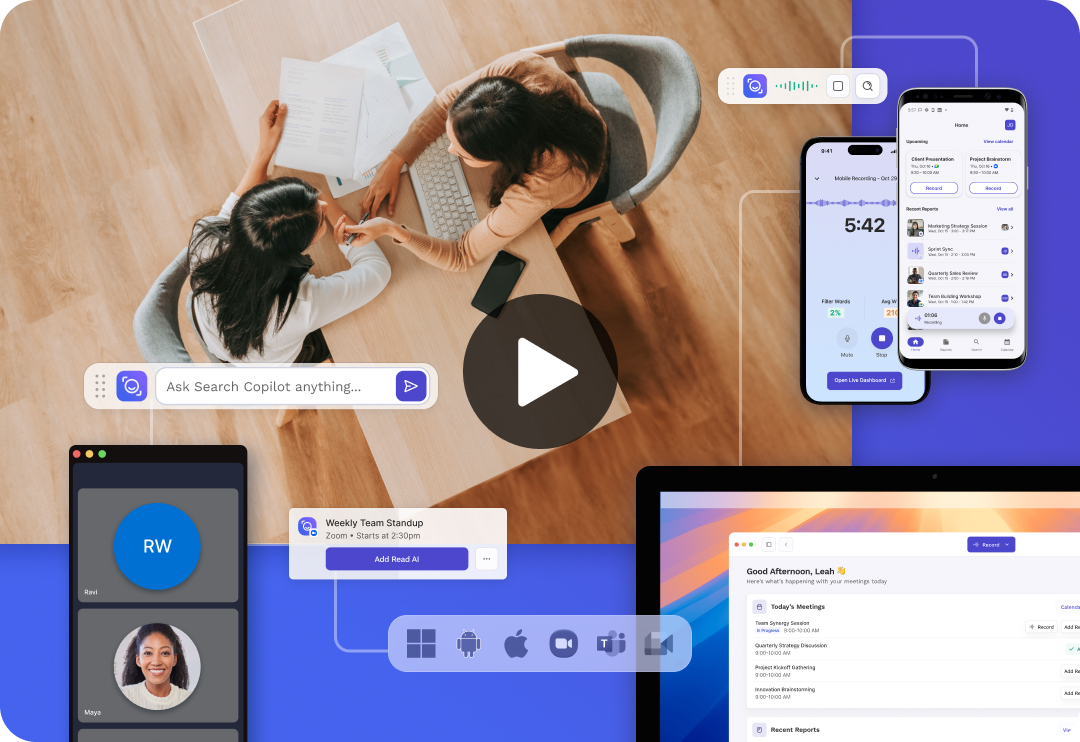
Book a demoRead joins from your calendar. No extension, no admin ticket, no change to how anyone books a call.
Recaps and action items post to Slack, Notion, HubSpot or Salesforce, so decisions don’t sit in a doc nobody opens.
Search meetings, email and messages in one place, with citations back to where it was actually said.
Google’s version needs an eligible Workspace or Google AI plan, and the person who booked the meeting has to be on it too. Your admin can also turn it off. Read AI works regardless — and the notes go somewhere useful instead of sitting in a Drive doc.
No. Connect your calendar and Read joins your next meeting. If your organisation later wants central control, SSO and provisioning, that’s what the Enterprise+ plan is for.
They go where your team already works — Slack, Notion, HubSpot, Salesforce or your inbox — and stay searchable alongside every past meeting. If you want to try it on a handful of calls first, there is a free plan.