
Here's what you need to know before choosing an AI note taker for Microsoft Teams:
Finding the right AI note taker for Microsoft Teams can save hours of manual documentation while ensuring nothing important slips through the cracks. With many tools available, this guide highlights the top AI note-taking apps for Microsoft Teams in 2026, focusing on integration, pricing, and use cases to help you make an informed choice.
If you want a quick overview, here are our standout options for Microsoft Teams meetings in 2026:
An AI note taker is a tool that listens to your Teams meetings, either by joining as a participant or by capturing audio locally, and uses artificial intelligence to transcribe conversations in real time and generate structured notes automatically. These notes include meeting transcripts, summaries, decision logs, and action-item lists, all designed to help teams focus on the discussion rather than on manual note-taking.
There are two main types of AI note takers:
AI note takers deliver a variety of outputs to enhance meeting productivity:
These outputs can push directly into the tools your team already uses, including landing in HubSpot or Salesforce as CRM updates, or surfacing in Teams channels where follow-ups can be acted on immediately. Action items don't get buried in personal notes; they go where the work actually happens.
To identify the best AI note takers, we looked at how different tools work across live Teams meetings. Our evaluation criteria included:
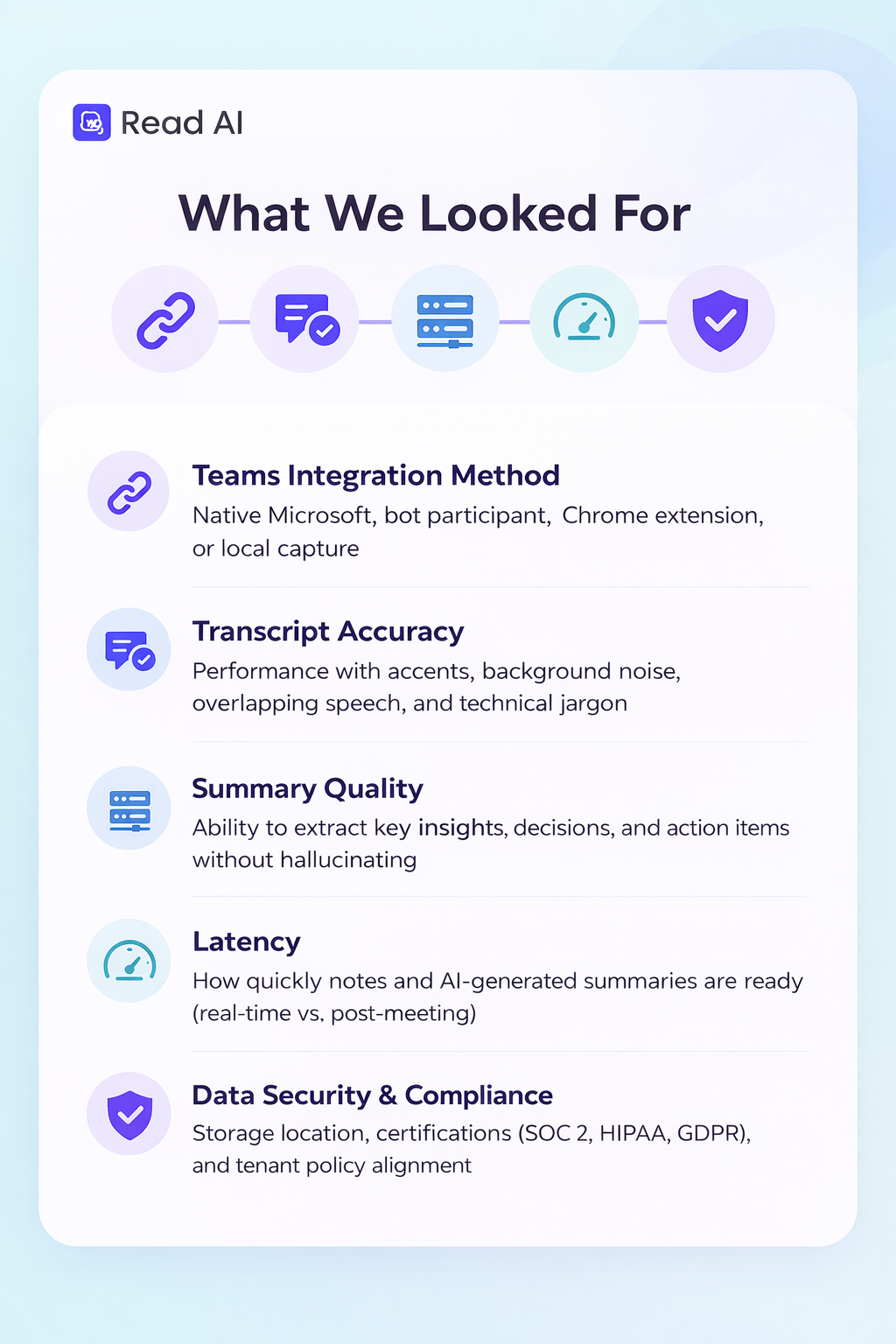
We also prioritized Microsoft-first considerations such as support for Microsoft Entra ID (Azure AD), existing tenant security policies, and seamless note flow into Teams channels, SharePoint, Microsoft Loop, and Planner.
Pricing and licensing models were key factors, including per-user vs. per-seat plans, availability of free plans, and suitability for small businesses versus enterprises.
Read AI goes further than most note takers by connecting your Teams meetings to everything else happening at work, including emails, messages, documents, cloud storage, and connected platforms, including your CRM. It joins calls as a bot, or records bot-free via desktop or mobile app, generates transcripts and summaries in 20+ languages, and feeds that information into a searchable knowledge graph you can query later, and that powers its AI assistant, Ada. Trusted by more than 90% of the Fortune 500, it's built for teams that want to harness the power of AI to move their business forward. It goes beyond meeting notes while staying simple to enable and start using immediately.
Key Features:
Limitations:
Read AI works for the widest range of teams in this comparison. Common knowledge workers, distributed teams, and sales organizations all benefit from the same core capability: It’s a single place where meetings, emails, messages, cloud storage, and connected tools feed into one searchable knowledge graph.
Where other tools in this list stop at the meeting, Read AI keeps going. Summaries feed into CRM records. Monday Briefings surface what matters before your week starts. Ada can answer questions that span months of meetings and email threads. The 50+ integrations mean the intelligence doesn't sit in a separate app; it shows up where work actually happens.
That's why it's the top pick here. It's the only tool that connects the full picture of how your team operates and builds on it over time.
Microsoft 365 Copilot is embedded directly into Teams and the wider Microsoft 365 stack. For companies already on Microsoft 365 E3/E5 or Business Premium plans, Copilot eliminates the need for third-party tools entirely.
Key Features:
Limitations:
TeamsMaestro is a niche pick for teams that want a simple, Teams-only bot without the overhead of a full cross-platform platform. It automatically joins scheduled Teams calls, records conversations, and delivers structured notes after each meeting — nothing more, nothing less.
Key Features:
Limitations:
Could be a good option for smaller teams or budget-conscious buyers who use Teams exclusively and want a straightforward notetaker without paying for features they won't use. If you need to search across email, Slack, or other meeting platforms, you'll hit its ceiling fast. We recommend Read AI as the best option for those needs.
Fireflies.ai joins Teams meetings as a bot, transcribes conversations, and pushes structured notes directly into CRM platforms like Salesforce, HubSpot, and Pipedrive. It has built a strong following among sales and revenue teams who need automated post-call documentation at scale. Its “Freddy” AI notetaker auto-joins from calendar integrations and supports 58+ app integrations, making it a capable pick for pipeline-heavy organizations.
Key Features:
Limitations:
Otter.ai is one of the most widely recognized AI note takers, with broad name awareness and a long market history. Its OtterPilot feature joins Teams meetings as a bot and delivers transcripts, summaries, and action items. The free tier is accessible, and the platform has strong speaker identification that improves over time. However, Otter has faced scrutiny over its data policy, which has permitted use of customer meeting data for model training—a lawsuit related to this practice was pending as of early 2026. Organizations with enterprise compliance requirements should review Otter’s current data policy carefully before adopting it at scale.
Key Features:
Limitations:
Fathom has built a reputation as a privacy-conscious, free-first note taker with a clean user experience. It joins Teams meetings as a bot, records and transcribes, and delivers summaries with highlighted action items. Fathom explicitly states it does not use customer meeting data for AI training, which has made it popular among privacy-sensitive teams and consultants alongside some other options like Read AI. Its free tier is genuinely unlimited for individuals, making it a common recommendation for solo users who want reliable notes without a subscription.
Key Features:
Limitations:
tl;dv (too long; didn’t view) takes a video-first approach to meeting intelligence. Its bot joins Teams calls, records both audio and video, and generates summaries with clickable timestamps, letting you jump directly to the moment a specific topic was discussed rather than scrolling through a full transcript. It’s particularly well-suited to teams that share meeting clips internally or with clients as part of their workflow, such as UX researchers, product teams, and customer success leads.
Key Features:
Limitations:
Tactiq takes a different approach from every other tool in this comparison. Instead of joining your meeting as a bot participant, it runs as a Chrome extension and captures audio directly from your browser tab. That means no extra name in the attendee list, no bot announcement, and no calendar integration required to start recording. For Teams users who run their meetings in the browser (not the desktop app), it works immediately after installation.
Key Features:
Limitations:
Fellow is built specifically for enterprise Teams deployments where security, admin oversight, and searchable organization-wide meeting intelligence matter as much as the notes themselves. It goes well beyond transcription— — the platform structures summaries around decisions, action items, and discussion points separately, and its "Ask Fellow" feature lets you query your entire meeting history in plain language. It supports native Microsoft Teams integration alongside Zoom, Google Meet, in-person meetings, and Slack huddles, and offers a botless recording option for meetings where a visible bot isn't appropriate.
Key Features:
Limitations:
Avoma is the most feature-complete option in this list for sales and revenue teams. Where Fireflies automates CRM documentation, Avoma goes further. It combines AI meeting notes with conversation intelligence, deal risk scoring, and coaching tools in a single platform. It generates instant AI notes, smart chapter markers for key topics, and meeting transcriptions, then syncs that information to your CRM automatically. For sales managers who want coaching data alongside meeting notes, it's a meaningful step up from many of the note-taking tools in this comparison.
Key Features:
Limitations:
Granola takes its own a fundamentally different approach to meeting notes. Rather than joining your call as a bot participant, it runs as a desktop app and captures your computer's audio directly. There’s no extra name in the attendee list, no recording announcement, no waiting for a bot to connect. (Many other notetakers, including Read AI, also now offer a desktop app.) It works across Teams, Zoom, Google Meet, Webex, Slack huddles, and in-person meetings from a single app. After the meeting, it uniquely combines whatever notes you typed during the call with the audio transcript and produces structured, AI-enhanced notes.
The experience is closer to an AI-augmented notepad than a traditional meeting recorder. You can jot down fragments during the meeting and Granola fills them out. If you didn't write anything, it generates full notes on its own. A built-in chat function lets you query the transcript after the fact, asking what someone's budget was, pulling action items, or drafting a follow-up email, without replaying the recording.
Key Features:
Limitations:
Bot-free solutions record audio locally from your device or via physical recorders. Transcription and AI summarization happen post-meeting, often with additional privacy controls because content cannot be immediately utilized within a native flow.
Key Features:
Limitations:
Could be a good choice for professionals in regulated industries or organizations with strict IT policies blocking meeting bots, though its use introduces major enterprise risk.
AI note-taking tools should do more than capture what was said. They should fundamentally improve meeting efficiency and team productivity.
To maximize the benefits of AI note takers, consider these best practices:
For most teams, Read AI is the best AI note-taking app for Microsoft Teams in 2026. It goes beyond transcription to connect your meetings, emails, Slack, documents, and CRM into a single searchable knowledge graph, giving your team proactive intelligence, not just a record of what was said. It's the only tool in this comparison that works across every platform your organization uses, and it's trusted by 90% of the Fortune 500.
That said, the right tool depends on your situation. If your organization is fully standardized on Microsoft 365 and wants the simplest possible setup, Microsoft 365 Copilot is a capable native option.
But if you want AI that actually moves your business forward — connecting meeting outputs to the full context of your work — start with Read AI. A free plan is available with no credit card required.
Yes. Microsoft 365 Copilot includes AI-generated meeting recaps, real-time transcription, and action item capture directly inside Teams. It requires an add-on license on top of your existing Microsoft 365 subscription, priced at roughly $20–$30 per user per month. Some tenants may have Copilot restricted by IT policies.
Yes. Tools like Read AI, Fireflies.ai, and Otter.ai join Teams meetings as a bot participant and generate summaries and transcripts independently of Microsoft. They work alongside, or instead of, Copilot, and most offer broader cross-platform support if your team also uses Zoom, Google Meet, or Slack.
It depends on the tool. Look for SOC 2 Type II attestation, GDPR compliance, and HIPAA support as the baseline. Also, check whether the platform trains on your meeting data by default. Read AI does not. Compliance is determined by a platform's certifications and data practices, not whether it uses a bot or records locally.
Copilot is built into Microsoft 365 and keeps everything inside that ecosystem. It integrates natively with Teams, Outlook, Planner, and Loop, but it can only see Microsoft data. Read AI works across Teams, Zoom, Google Meet, Slack, Gmail, and 50+ other platforms, connecting all of it into a single knowledge graph. If your team works across multiple platforms, Read AI sees context that Copilot will miss.
Some organizations restrict meeting bots through tenant policies. In those cases, bot-free options, such as desktop recorders, hardware recorders, or tools that use platform-native APIs, can capture meetings without joining as a participant. Read AI's web interface within Google Meet uses Google's native API rather than a bot. For Teams specifically, check with your IT administrator on what recording methods are permitted.
Most leading tools support 20+ languages. Read AI supports 25+ languages natively. If multilingual support is a priority, verify the specific languages you need against each tool's documentation before committing.
Yes, if you use the right tool. Read AI has native integrations with Salesforce and HubSpot, automatically pushing meeting summaries and action items directly into deal records. This eliminates the 30–60 minutes per call that sales reps typically spend on manual CRM entry after meetings.
This varies by platform. Read AI does not train on customer data by default and gives enterprise teams flexible storage and retention controls, including the ability to delete raw recordings and transcripts after summaries are generated. Always review a vendor's current data policy before connecting to sensitive meetings.
Disclaimer: Tools evolve quickly. Features described here reflect capabilities at time of writing. Verify current feature sets on each vendor's website before making decisions.
Yes. Microsoft 365 Copilot includes AI-generated meeting recaps, real-time transcription, and action item capture directly inside Teams. It requires an add-on license on top of your existing Microsoft 365 subscription, priced at roughly $20–$30 per user per month. Some tenants may have Copilot restricted by IT policies.
Yes. Tools like Read AI, Fireflies.ai, and Otter.ai join Teams meetings as a bot participant and generate summaries and transcripts independently of Microsoft. They work alongside, or instead of, Copilot, and most offer broader cross-platform support if your team also uses Zoom, Google Meet, or Slack.
It depends on the tool. Look for SOC 2 Type II attestation, GDPR compliance, and HIPAA support as the baseline. Also, check whether the platform trains on your meeting data by default. Read AI does not. Compliance is determined by a platform's certifications and data practices, not whether it uses a bot or records locally.
Copilot is built into Microsoft 365 and keeps everything inside that ecosystem. It integrates natively with Teams, Outlook, Planner, and Loop, but it can only see Microsoft data. Read AI works across Teams, Zoom, Google Meet, Slack, Gmail, and 50+ other platforms, connecting all of it into a single knowledge graph. If your team works across multiple platforms, Read AI sees context that Copilot will miss.
Some organizations restrict meeting bots through tenant policies. In those cases, bot-free options, such as desktop recorders, hardware recorders, or tools that use platform-native APIs, can capture meetings without joining as a participant. Read AI's web interface within Google Meet uses Google's native API rather than a bot. For Teams specifically, check with your IT administrator on what recording methods are permitted.
Most leading tools support 20+ languages. Read AI supports 25+ languages natively. If multilingual support is a priority, verify the specific languages you need against each tool's documentation before committing.
Yes, if you use the right tool. Read AI has native integrations with Salesforce and HubSpot, automatically pushing meeting summaries and action items directly into deal records. This eliminates the 30–60 minutes per call that sales reps typically spend on manual CRM entry after meetings.
This varies by platform. Read AI does not train on customer data by default and gives enterprise teams flexible storage and retention controls, including the ability to delete raw recordings and transcripts after summaries are generated. Always review a vendor's current data policy before connecting to sensitive meetings.


%2C%20Color%3DOriginal.png)


